
 By
By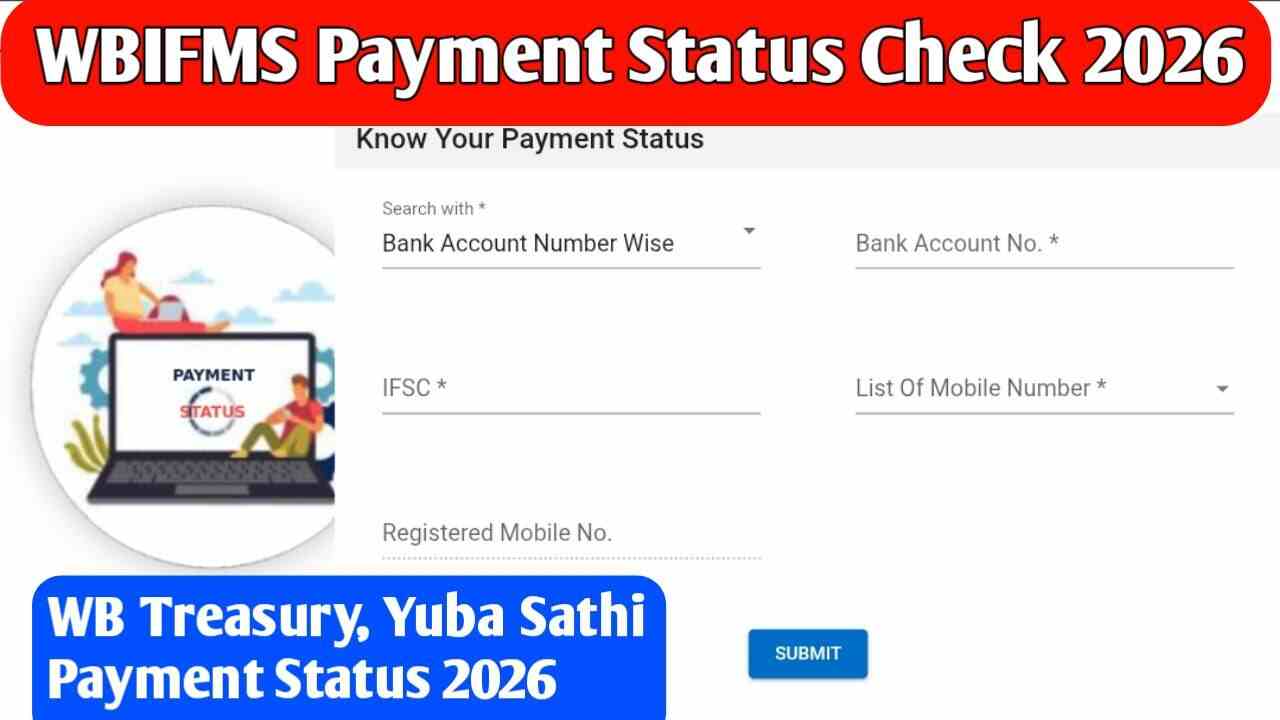
WBIFMS Payment Status 2026: Many people in West Bengal wait for money from the government. This can be salary, pension, or help from schemes like Yuba Sathi. Good news – you can check everything online from your phone or computer in just a few minutes. No need to visit any office.
What is WBIFMS?
WBIFMS stands for West Bengal Integrated Financial Management System. It is the official online system run by the West Bengal Finance Department. The portal handles all government payments in the state – salaries, pensions, teacher honorarium, and money from welfare schemes. It works for everyone who gets money from the state government.
WBIFMS Payment Status 2026
WBIFMS is the main system used by the West Bengal government to send money to people. It covers salaries for employees, pensions, and benefits under many schemes. Follow these simple steps to check your WBIFMS payment status.
Step 1: Go to the Official WBIFMS Website
Open a web browser on your computer or mobile phone. Type wbifms.gov.in in the address bar and press Enter.
Step 2: Find the Payment Status Option
Once the homepage loads, look for the payment status section. You may find it under headings like:
-
Payment Status
-
Track Bill Status
-
e-Billing
On some versions of the WBIFMS portal, you need to go to the e-Billing page first, then click on “Payment Status.”
Step 3: Enter Your Details
The system will ask you for some information. Depending on who you are, you may need to enter.
Bill Number : If you submitted a bill or claim.
Employee ID : If you are a government employee checking salary.
GRN (Government Receipt Number) : If you have made a payment to the government.
Challan Number : For tax or fee payments.
Type the number carefully. Even a small mistake can show the wrong result.
Step 4: Click Search or Submit
After entering your number, click the “Search” or “Submit” button. The system will take a few seconds to find your payment details.
Step 5: See Your Payment Status
Your WBIFMS payment status will appear on the screen. You will see messages like processed, pending, or rejected. If your payment is processed, you will also see the date when the money was sent to the bank.
GRIPS 2.0 Payment Status
GRIPS 2.0 is the simple way to pay fees, taxes, or other money to the West Bengal government online. If you made any payment through it, you can check the GRIPS 2.0 payment status easily.
Visit wbifms.gov.in/GRIPS/. On the home page, you will see clear buttons like “GRN Status (Challan Reprint)” and “Challan Search (Search Past Payment)”. Click on one of them. Enter your GRN number or other details. The page will show you right away if the payment went through, the date, and the amount.
IFMS Payment Details
IFMS stands for the full system that manages all government money in West Bengal. It is the same as WBIFMS – just another name for the same helpful website.
To see your IFMS payment details 2026, open wbifms.gov.in and go to “Know Your Payment Status”. Put in your bank account number with IFSC or your mobile number. You will get full details like the amount, date, and status. Many government workers and scheme members use this to view their payment history.
Yuba Sathi Payment Status 2026
Yuba Sathi is a special scheme that gives Rs 1,500 every month to unemployed young people in West Bengal. Payments for 2026 have started, and the money goes straight to your bank account.
The official Yuba Sathi website (yubasathi.wb.gov.in) is now only for help after applications closed. To check your Yuba Sathi payment status 2026, use the WBIFMS. Enter your bank account number and IFSC code or your registered mobile number. It will tell you if the Rs 1,500 has reached your account.
WB Treasury Payment Status 2026
Before the government sends money to your bank account, the local treasury office must approve the bill. If your payment is delayed, it is helpful to check the treasury status.
You can do this directly through the WBIFMS portal. You will need your specific bill number or token number provided by the department you are dealing with. By entering this number into the treasury section of the website, you can see if the treasury officer has passed your bill, if it is still pending, or if it has been returned for corrections.
Check Payment Status Using the WBiFMS Mobile App
The government also has a free app called WBiFMS on Google Play Store. Download it once and use it anytime. The app shows the same payment details as the website. It also sends SMS or email alerts for new payments. Many people find the app easier for daily checks.
Latest Updates on Payments in April 2026
- Panchayat honorarium for January and February 2026 is being sent now. March 2026 process has started.
- Many government employees have received their March salary.
- Yuva Sathi ₹1500 payments are being credited in batches. Check regularly if you applied.
- Some salary and pension payments for early 2026 faced small delays, but most are now cleared.
The Finance Department keeps updating the portal, so fresh data appears every day.
Why Check WBIFMS Payment Status in 2026?
April 2026 is here, and many payments for March and April are being processed. Some people have already received their January and February money, while others are still waiting. Checking online lets you know the exact status – whether the money is ready, sent to your bank, or still in process.
ALSO READ:
Atmanirbhar Asom Abhijan 2.0 : CMAAA 2.0 Status Check, Apply Online, Current Update
Nabanna Scholarship Apply Online 2026 : Nabanna Scholarship Status Check, Amount, Last Date 2026



Plz help me sir
You can tell us what kind of problem you are facing.
My monthly disabled pension of 1000 haven’t processed in my account …kindly help to resolve the above issue
Check my status …. yuva sathi pement
I am not getting any messages or any payments till now
Kobe pabo
Gotdkofofod